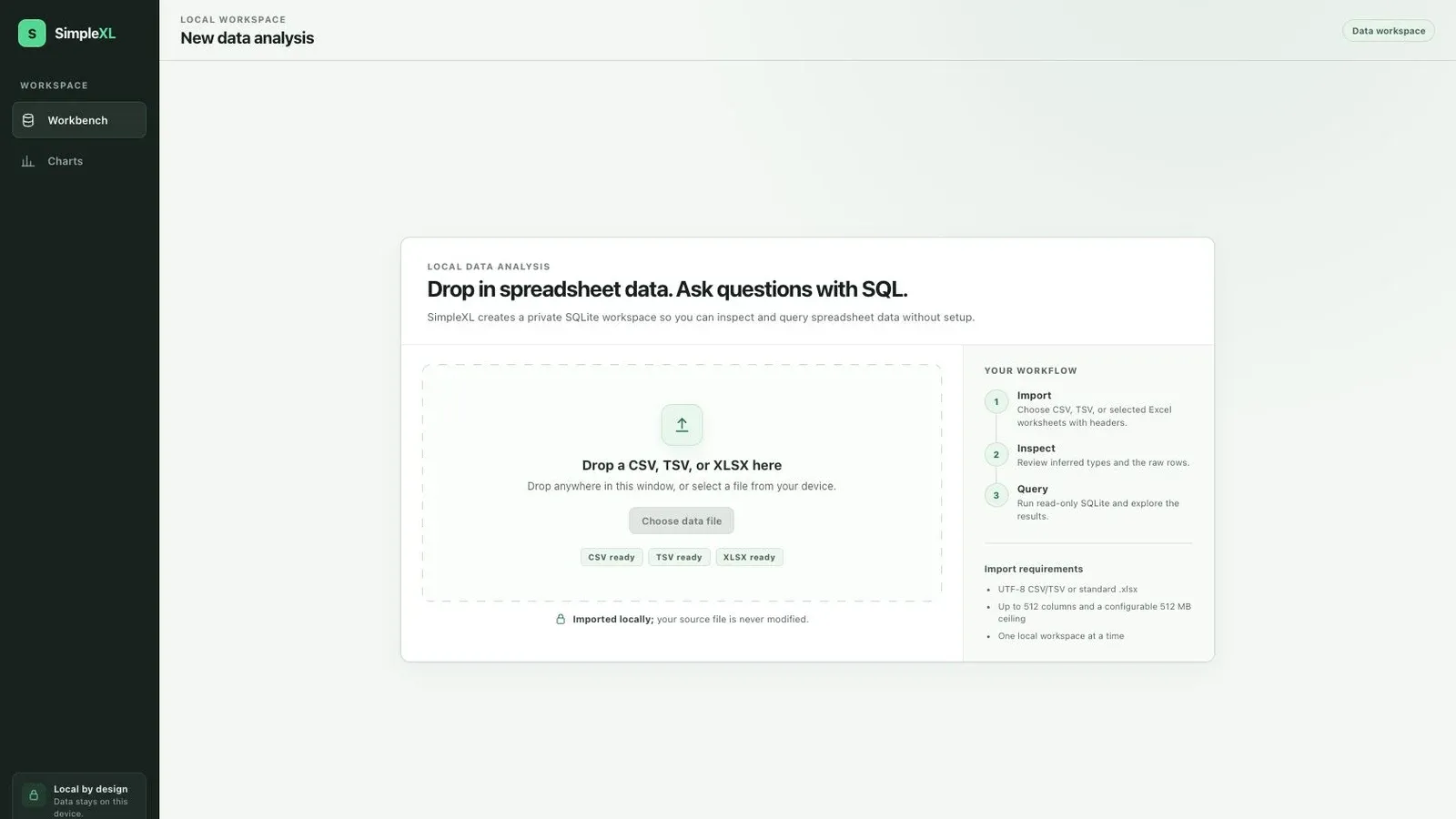
A shorter path from spreadsheet to answer
SimpleXL is a small desktop workbench for the questions that sit awkwardly between a spreadsheet and a full business-intelligence stack. The data is already in a CSV, TSV, or Excel workbook. Someone needs to inspect it, group it, filter it, or test an assumption, but setting up Power Query, Power BI, a database server, or a cloud account would take longer than the analysis.
The product makes that path deliberately short: add one or more local files, inspect the inferred tables and columns, write ordinary SQLite SQL, review bounded results, and optionally turn a result into a simple chart.
It is not trying to reproduce Excel or become a dashboard platform. It is a focused tool for exploring tabular data with less setup and a clearer execution model.
- CSV / TSV / XLSX
Choose local files or selected workbook sheets.
- Validate and copy
Stream, inspect, infer types, and preserve source values.
- Private SQLite
Review queryable tables, schemas, and paginated raw rows.
- Read-only SQL
Filter, join, group, aggregate, and cancel safely.
- Results and charts
Copy, export bounded CSV, or create a session visual.
LOCAL DEVICEPrivate temporary workspace · source files remain unchanged
The complete path stays on the user’s device: a source file becomes a temporary queryable copy, then a bounded answer or explicitly chosen export.
Local-first is the product, not a deployment detail
Spreadsheet data can contain customer records, operational exports, financial details, research material, or other information that should not be uploaded casually. SimpleXL keeps the core workflow on the user’s device. It does not require an account, analytics service, hosted database, or runtime network connection.
Imports copy data into a private, temporary SQLite workspace and never modify the source file. The interface reinforces that boundary before a file is selected, and the desktop shell exposes only the narrow file and export capabilities the workflow needs.
That local-first promise shapes the product architecture, error messages, limits, and release criteria. Privacy is not a settings toggle added after the useful work is complete; it is one of the reasons the tool exists.
Opened for validation and streaming; never edited in place.
01 TAURI DESKTOP SHELL
Restrictive capabilities and picker-granted paths02 RUST SERVICE BOUNDARY
Validation, streaming, limits, progress, and cancellation03 PRIVATE SQLITE WORKSPACE
Temporary copy · read-only query connectionquery_only · authoriser allowlist · bounded resultsNo account, hosted database, analytics service, or CDN.
Each layer narrows the next one: operating-system file grants constrain the Rust commands, and the Rust boundary constrains what SQLite can execute or return.
From files to a queryable workspace
SimpleXL supports UTF-8 CSV and TSV files plus standard .xlsx workbooks. Delimited files can use detected or explicit separators. Excel imports expose worksheet selection, retain the final collision-safe table names, and use cached formula results without evaluating formulas or macros.
Each successful source becomes a table in the current workspace. The application preserves original names for display while normalising SQL identifiers, infers conservative SQLite types, keeps mixed values rather than discarding them, and provides a paginated raw-data preview before analysis begins.
The workbench then brings schema search, CodeMirror SQL editing, current-statement execution, session history, virtualised results, pagination, copy, and bounded CSV export into one desktop flow. Multiple imported tables remain available to the same query, so joins and comparisons do not require a separate setup step.
A narrow, explainable query boundary
Letting someone type SQL into a desktop application creates an unusually clear product responsibility: the tool must make useful queries easy without quietly turning into an unrestricted database console.
SimpleXL therefore accepts one read-only result-producing statement at a time. A separate read-only SQLite connection, query-only mode, an authoriser allowlist, engine limits, timeouts, payload caps, and explicit cancellation keep the query surface bounded. Writes, unsafe pragmas, attached databases, extension loading, and multiple statements are rejected.
The same approach applies to imports and exports. File sizes, column counts, row sizes, workbook expansion, returned text, result pages, complete results, and image dimensions all have explicit ceilings. Failed, cancelled, corrupt, or unsupported imports leave the current usable workspace intact rather than committing a partial replacement.
Those constraints are visible product behaviour, not only defensive code. When work cannot continue safely, the interface should explain the boundary and give the user a practical next action.
OPERATING_BOUNDS / EXPLICIT_NOT_IMPLIED
- 3
- Supported source formatsUTF-8 CSV and TSV plus standard XLSX workbooks.
- 512
- Maximum columnsApplied before data enters the temporary workspace.
- 50,000
- Complete-result ceilingQueries and exports stay useful without becoming unbounded.
- 5 sec
- Query deadlineExpensive work can also be cancelled explicitly.
- 0
- Writes to source filesImports create a private working copy instead.
Charts without becoming a BI suite
The current build can turn a successful query into a named bar, line, or scatter chart. A chart records the SQL and output-column order that produced it, refreshes explicitly when its configuration changes, and keeps an exact table fallback for the points actually rendered.
Large result sets are reduced deterministically or rejected when a visual would become misleading or unusable. Charts can be exported as bounded PNG, JPEG, or sanitised SVG files, while active content, unsafe destinations, oversized payloads, and mismatched formats are rejected at the native boundary.
This is intentionally the edge of the feature. SimpleXL helps someone explore a result and share a useful visual; it does not add dashboards, scheduled refreshes, semantic models, or cloud collaboration before the local analysis loop has proved its value.
Building the fast path in Rust and Tauri
The interface uses React and TypeScript, while Tauri 2 provides the desktop shell and a narrow typed command boundary. Rust owns file validation, streaming imports, workbook inspection, SQLite connections, query execution, cancellation, chart extraction, and native exports.
Moving parsing and database work out of the webview keeps the interface responsive and makes the trust boundary easier to reason about. The workspace is disk-backed and ephemeral, result and preview pages cross the application boundary in bounded chunks, and long-running work reports progress or accepts cancellation at safe checkpoints.
The project also includes a deterministic release benchmark and an adversarial security regression suite. Performance claims come from a reproducible workload, while capability, CSP, SQLite, importer, export, cancellation, and temporary-workspace behaviour are exercised as release gates.
Where the project is now
SimpleXL is an unreleased 0.1.0 application in active development. The complete local analysis loop is working: CSV, TSV, and Excel import; multi-table inspection; read-only SQL; paginated and virtualised results; copy and CSV export; and session-local charts with image export.
The next milestone is persistence and distribution. That includes saving and reopening workspaces, recent-workspace recovery, accessibility and keyboard review, signed desktop builds, release automation, checksums, migrations, and a licensing decision.
Until those pieces are complete, the repository is the right place to follow the work. The browser preview can demonstrate the interface, but native file access, the private Rust workspace, and the real query boundary belong to the packaged desktop application.
What building it is teaching me
SimpleXL is an exercise in removing ceremony without hiding consequences. The interface should feel lighter than a data platform, but the underlying behaviour still has to be precise about types, limits, cancellation, source safety, privacy, and what a query actually did.
It has reinforced that a trustworthy local tool is built from many small, explicit contracts. A clear import promise is only credible when a failed replacement is atomic. Read-only SQL is only credible when every escape route is tested. A chart is only useful when its reduction and source query remain understandable.
The broader lesson is that simplicity is not the absence of engineering. It is the result of putting the engineering behind a short, legible path from a real file to a useful answer.