The gap between intention and habit
Most visits to a distracting website do not begin with a considered decision. A new tab opens, a familiar letter is typed, and muscle memory finishes the journey before there has been time to ask whether the visit is useful.
Traditional blockers answer that problem with prohibition: the site is available or it is not. I built WaitAMinute to explore a more flexible idea. What if the browser added just enough friction for intention to catch up with habit?
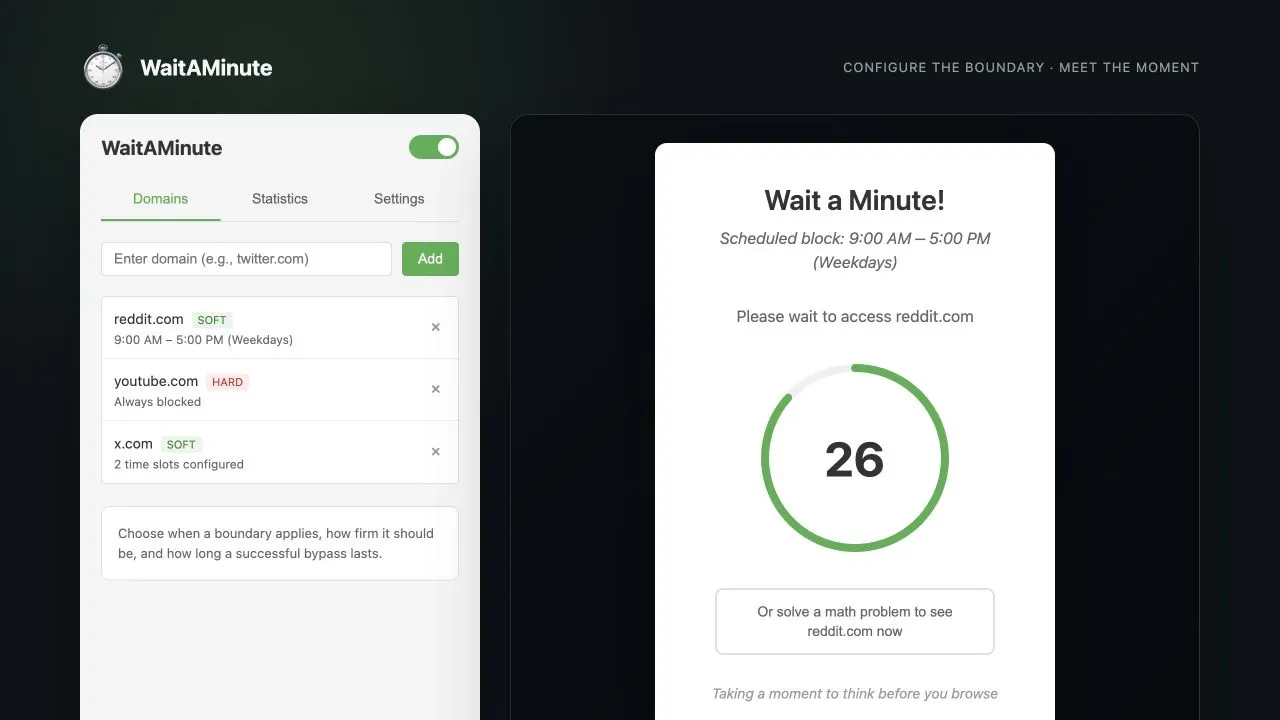
WaitAMinute is a Chrome extension that intervenes before selected websites load. It does not assume that every visit is bad or that self-control can be outsourced to software. Instead, it creates a brief moment in which the user has to decide whether continuing is worth the effort.
A pause, not a punishment
The core loop is intentionally small:
- Add a distracting domain to the extension.
- Choose when the boundary should apply and whether it is soft or hard.
- Navigate normally until the extension recognises a matching visit.
- Meet a pause before the site becomes available.
- Complete the challenge to continue, or close the tab and return to what you intended to do.
A soft block can use a countdown timer, a simple maths problem, or an optional Cloudflare Turnstile challenge. Completing it grants a temporary bypass, so a deliberate visit does not become a fight on every page load. A hard block removes the bypass entirely for the configured period.
That distinction matters. Sometimes the useful intervention is a breath between impulse and action. At other times, the user has already made the decision and wants the browser to hold the boundary for them.
Calibrating the friction
The interesting product question was not how to make access impossible. It was how to make the interruption meaningful without making the extension so irritating that the user disables it.
WaitAMinute makes that friction configurable at several levels:
- Domains can be blocked all the time or only during selected time slots and days.
- Soft and hard blocks can reflect different relationships with different sites.
- Countdown duration controls how long the moment of reflection lasts.
- A maths challenge offers an active route through the pause.
- A successful soft-block challenge grants access for a configurable number of minutes.
The extension therefore acts less like a parental control and more like a commitment device. The user defines the boundary while thinking clearly; the product brings that decision back when attention is more vulnerable.
Privacy without an application backend
A tool that observes browsing behaviour needs to be restrained about what it collects. WaitAMinute has no application server, account system, or external analytics layer.
Blocked domains and preferences are kept in Chrome’s extension-managed synchronised storage, while behavioural statistics remain in local extension storage. The optional Turnstile challenge is the one feature that deliberately reaches an external challenge provider; the countdown and maths options work without it.
This architecture keeps the product understandable. The extension needs to know the user’s chosen domains, schedules, and recent bypasses. It does not need a central record of their browsing history.
Making the habit visible
The first version focused on interruption. The next step was helping users understand the pattern behind it.
The popup tracks blocked attempts and completed challenges, groups activity by domain, and presents a rolling fourteen-day view. That creates a useful distinction between an interruption and a reconsidered visit. A high number of blocks is not automatically success; the more revealing signal is how often the pause changed what happened next.
Statistics are deliberately secondary to the intervention itself. They help the user notice patterns without turning focus into another elaborate productivity score or sending behavioural data elsewhere.
Engineering the moment before the page
I built the extension with Manifest V3 and vanilla JavaScript. A content script runs at the start of navigation, matches the current hostname against the configured domains and schedules, and places the challenge above the page. A background service worker maintains settings migrations and the short-term statistics used by the popup.
Timing is central to the experience. If the distracting page flashes into view before the block appears, the extension has already lost part of the interaction. A preload shield covers that gap while settings are read and the correct state is calculated. Storage-change listeners update behaviour without requiring a browser restart, and domain matching includes subdomains so one rule behaves consistently across a site.
The implementation stays deliberately modest: HTML, CSS, JavaScript, browser storage, and the extension APIs needed to intervene. The product idea is the difficult part, not the size of the stack.
What I learned
WaitAMinute reinforced that friction is not automatically bad user experience. Removing every obstacle is valuable when someone is trying to complete an intentional task. It is less helpful when a product is accelerating behaviour the person did not consciously choose.
The quality of the intervention depends on respecting agency. A useful focus tool should help someone act on a decision they already made, not quietly substitute the designer’s judgement for their own.
The broader idea
Modern attention products are extraordinarily good at collapsing the distance between impulse and consumption. WaitAMinute is a small experiment in restoring some of that distance.
The extension is an open-source prototype, but the principle travels further: technology can do more than make every action faster. Sometimes the most helpful interface is the one that gives a person enough time to decide whether they want to act at all.